
As the StarRocks ecosystem matures and adoption grows, the need for reliable, production-grade operational tooling has never been more critical. StarRocks delivers exceptional speed for OLAP workloads, but managing lifecycle operations, specifically backups and disaster recovery, often falls to manual SQL scripts or fragile cron jobs cobbled together by each team independently.
To address these challenges, the Deep.BI team has built starrocks-backup-and-restore: a production-ready solution designed specifically for operating StarRocks at scale.
StarRocks provides powerful built-in SQL commands for backup and restore operations through BACKUP SNAPSHOT and RESTORE SNAPSHOT commands. For small datasets or development environments, these commands work well due to the limited data volume.
However, as organizations scale to terabytes and petabytes of data, the limitations become painfully apparent.
The core issue is that while StarRocks supports backing up specific partitions, there's no built-in mechanism to track which partitions have changed automatically. Teams can manually craft BACKUP commands for individual partitions, but identifying which partitions changed since the last backup requires custom tooling.
When managing a 100TB dataset that grows by 500GB daily, the math becomes unsustainable without automation. Manually identifying changed partitions across dozens of tables is error-prone and time-consuming. Most teams end up running full backups by default, copying 100TB even though only a fraction has changed. The time, storage, and network bandwidth requirements make this approach impractical for many production environments.
Beyond the storage inefficiency, there are operational challenges that emerge in production:
The starrocks-backup-and-restore is a lightweight, metadata-driven CLI tool designed to solve these exact problems. It wraps StarRocks’ native backup primitives in a clean, automatable Python interface that fits naturally into modern data infrastructure.
The philosophy behind the tool is straightforward:
leverage what StarRocks already does well, add the missing pieces required for production deployments, and keep it simple enough to adopt without extensive training or major infrastructure changes.
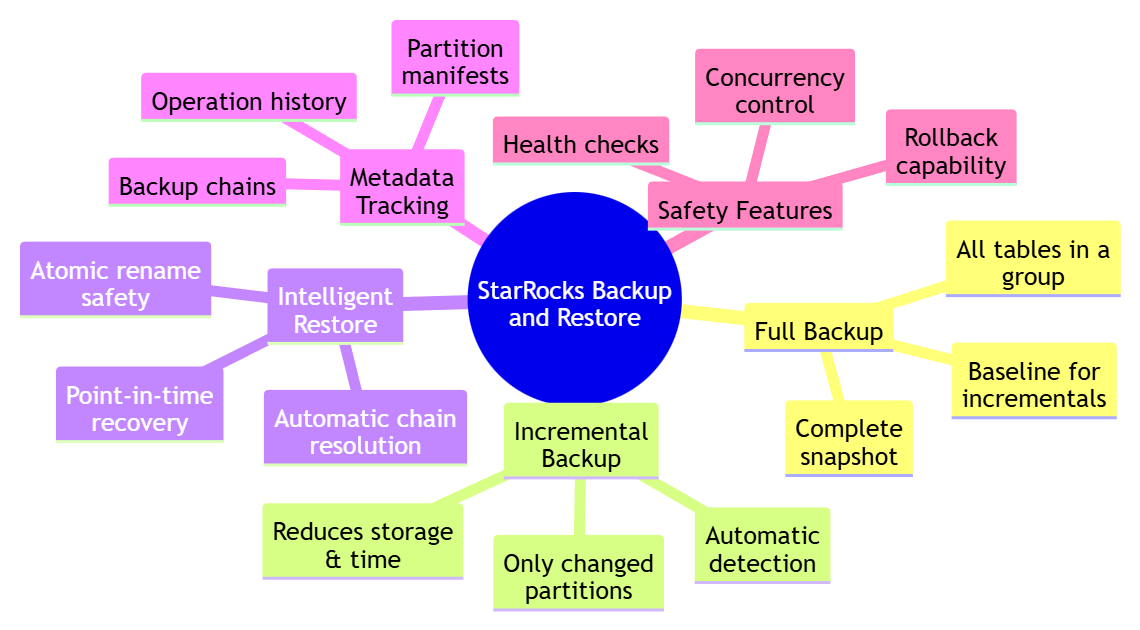
The key innovation is partition-level incremental backups.
StarRocks organizes large tables into partitions, typically by date or another dimension. While StarRocks can back up individual partitions, there's no built-in mechanism to track which partitions have changed since the last backup.
The starrocks-backup-and-restore fills this gap by maintaining a metadata database that records exactly which partitions were backed up, when, and under which label.
When you run an incremental backup, the tool:
For a daily partitioned table with a year of historical data, this means backing up one partition instead of 365. The time and storage savings compound rapidly at scale.
Unlike scripts that "fire and forget," the starrocks-backup-and-restore maintains a complete operational state in a dedicated database.
Every backup operation is recorded with its label, timestamp, status, error messages, and a manifest of exactly which partitions were included.
This metadata serves multiple purposes:
The metadata is stored in a separate ops database within StarRocks itself, keeping everything in one place while isolating operational data from business data.
Rather than treating all tables identically, the starrocks-backup-and-restore introduces the concept of inventory groups. These are named collections of tables that share the same backup strategy.
You might group fast-changing transactional tables separately from slow-changing reference tables, or organize them by business criticality – mission-critical tables requiring hourly backups versus less critical tables backed up weekly. The grouping strategy depends entirely on operational needs.
Once groups are defined, one can simply reference them by name when running backups. The tool handles the rest, ensuring consistency and reducing the chance of human error.
One of the most valuable production features is single-table point-in-time restore.
In real-world scenarios, you rarely lose an entire cluster at once. More commonly, a table is accidentally truncated or a faulty ETL job corrupts specific data.
The starrocks-backup-and-restore allows restoring just one table to a specific backup timestamp, minimizing downtime and data loss for the rest of your warehouse. The restore process uses temporary tables and atomic rename operations, ensuring that production data remains untouched if anything goes wrong.
This capability transforms disaster recovery from a nuclear option – where everything must be restored and hours of data are lost – into a precise surgical tool.
We made deliberate choices about what the tool should and shouldn't be:
Minimal dependencies: It's a Python CLI with a handful of standard dependencies. No complex infrastructure required. Install via pip and run immediately.
Leverage native capabilities: We don't reimplement backup mechanics. We wrap StarRocks's native commands with intelligence, organization, and state management.
Fit existing workflows: Whether you're using Airflow, cron jobs, or CI/CD pipelines, the starrocks-backup-and-restore integrates naturally. It's designed to be automated.
Opinionated but flexible: The tool has opinions about metadata structure and operational patterns, but it doesn't force a specific backup schedule or organizational model. You can define inventory groups and backup strategies that match your current needs.
StarRocks delivers exceptional analytical performance, but operating it reliably at scale requires more than fast queries. Production environments need predictable backups, clear state tracking, and confidence that data can be restored quickly and precisely when something goes wrong.
The starrocks-backup-and-restore tool fills these gaps by adding incremental backups, metadata visibility, and structured organization on top of StarRocks’ native capabilities. Its lightweight, metadata-driven approach turns backups from ad-hoc scripts into a reliable operational workflow—reducing storage costs, simplifying processes, and strengthening disaster recovery readiness.
It’s easy to adopt, integrates cleanly with existing pipelines, and gives teams the confidence that their data lifecycle is fully protected.
To learn how to install, configure, and run the tool in practice, continue to the next article where we walk through the step-by-step tutorial.


